dbt Series #2 Understanding dbt Tests: A Practical Walkthrough with LeetCode 175
write

Data quality doesn't happen by accident — it's tested for. In dbt, tests are how you turn assumptions about your data ("this column should never be null", "this ID should be unique") into automated checks that run every time your pipeline runs.
In this post, we'll walk through a small dbt project built around the classic LeetCode 175 (Combine Two Tables) problem, and use it to explain the four most common built-in dbt tests: not_null, unique, accepted_values, and relationships.
The Project Setup
The project has a simple structure: two source tables (person and address) get staged into models, and then joined into a final solution model.
sources.yml — declares where the raw data lives:
version: 2

sources:
  - name: leetcode175
    schema: leetcode175
    tables:
      - name: person
      - name: address
__person.sql and __address.sql — thin staging models that just select from the sources:
select * from {{ source('leetcode175', 'person') }}
select * from {{ source('leetcode175', 'address') }}
sol_175.sql — the final model, joining person and address:
select firstname, lastname, city, State
from {{ ref('__person') }} p
join {{ ref('__address') }} a
    on p.personid = a.personid
None of this logic is complex — but that's exactly why testing matters. A join like this can silently produce wrong results if the underlying assumptions about the data break: duplicate IDs, missing keys, unexpected values. dbt tests catch these before they become a bad dashboard or a bad decision.
Where Tests Live: sol.yml
All the tests in this project are defined in sol.yml, attached to columns on specific models. dbt supports two broad categories of tests:
- Generic tests — reusable, parameterized tests you apply to a column with a few lines of YAML (the four we'll cover below).
This project uses only generic tests, which is where most day-to-day data quality checks live.
Test 1: not_null
- name: __person
  columns:
    - name: PersonId
      data_tests:
        - not_null
This is the simplest test in dbt — it fails if any row has a null value in the specified column. Here, it's applied to PersonId in the __person model, which makes sense: a person record without an ID is essentially unusable, especially since this column is about to be used as a join key.
not_null is usually the first test you reach for on any primary key or any column your downstream logic depends on.
Test 2: unique
- name: __person
  columns:
    - name: PersonId
      data_tests:
        - not_null
        - unique
unique checks that no value in the column appears more than once. Combined with not_null, this is dbt's version of enforcing a primary key — every row has a PersonId, and no two rows share one.
This pairing (not_null + unique) is so common that it's worth memorizing as the default test set for any ID column in a project.
Test 3: relationships
- name: __address
  columns:
    - name: PersonId
      data_tests:
        - not_null
        - relationships:
            arguments:
              to: ref('__person')
              field: PersonId
This is a referential integrity test — it checks that every PersonId in __address actually exists in __person. In relational database terms, this is what a foreign key constraint would normally enforce.
Why does this matter for sol_175.sql? Because that model does an inner join between __person and __address on PersonId. If __address contained a PersonId with no matching row in __person, that row would simply be silently dropped from the join — no error, no warning, just missing data. The relationships test catches that gap before it becomes an invisible bug.
Test 4: accepted_values
- name: sol_175
  columns:
    - name: state
      data_tests:
        - not_null
        - accepted_values:
            arguments:
              values: ['S1', 'S2', 'S3']
    - name: city
      data_tests:
        - not_null
        - accepted_values:
            arguments:
              values: ['C1', 'C2', 'C3']
accepted_values restricts a column to a known, finite set of values. Here, it's applied to the final output model sol_175 rather than a staging model — a good practice, since it validates the data your consumers will actually see.
If a new state value like 'S4' shows up unexpectedly (say, from a data entry error or an upstream schema change), this test fails loudly instead of quietly flowing downstream into reports.
Why Test at Different Layers?
Notice the layering in this project:
| Model | Tests | Purpose |
|---|---|---|
__person |
not_null, unique on PersonId |
Validate the "one" side of the relationship |
__address |
not_null, relationships on PersonId |
Validate the "many" side and its link back |
sol_175 |
not_null, accepted_values on state, city |
Validate the final, consumer-facing output |
This is a common and deliberate pattern in dbt projects: test structural integrity (keys, relationships) close to the source, and test business logic (valid categories, expected ranges) close to the output. It means when a test fails, the model it fails on tells you roughly where in the pipeline the problem originated.
Running the Tests
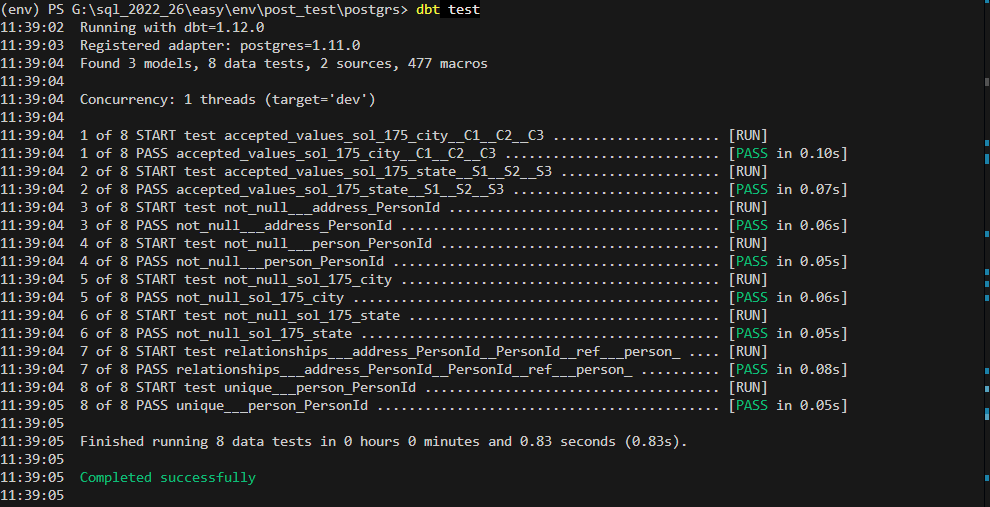
Once these are defined, running them is a single command:
dbt test
You can also scope it to just one model:
dbt test --select sol_175
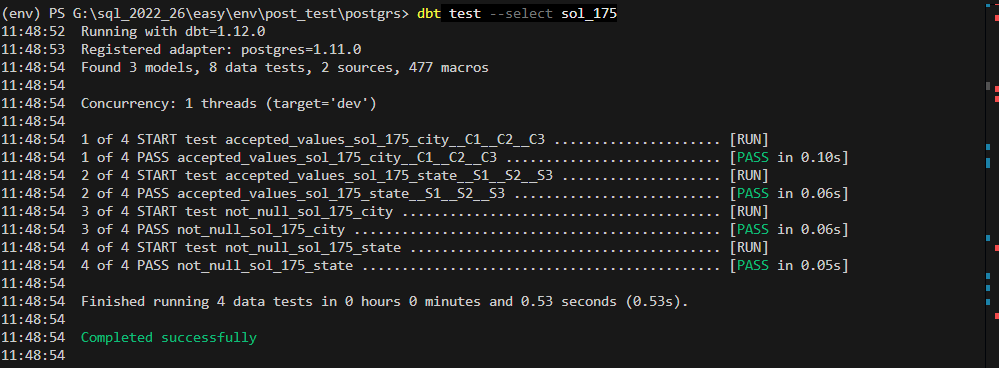
dbt compiles each generic test into a SQL query under the hood — for example, unique becomes a GROUP BY ... HAVING COUNT(*) > 1 style query — and reports a pass or fail for each one. Any failure returns the offending rows, so you're not just told that something broke, but what broke.
Takeaway
Even a two-table join like this LeetCode problem benefits from tests: they turn implicit assumptions ("PersonId is unique", "every address belongs to a real person", "state is always one of three values") into explicit, automated checks. That's the core idea behind dbt testing — not catching exotic edge cases, but making sure the basic contracts your data is supposed to honor actually hold, every single time your pipeline runs.
Comments
Join the discussionNo comments yet. Be the first to comment.
