
In the first two posts of this series, we built dbt models and learned how to structure our data pipelines. But here's a question: How do we know our data is right?
That's where data tests come in. Today, we're diving into singular tests—the most flexible (and sometimes most powerful) way to validate your data in dbt.
Quick Recap: What Are Data Tests?
Data tests are SQL queries that check for data quality issues. If a test query returns rows, something is wrong—the test fails. If it returns zero rows, the test passes.
In dbt, there are two types of tests:
Generic tests (out of the box: unique, not_null, accepted_values, relationships)
Singular tests (custom SQL queries you write yourself)
Today, we're focusing on singular tests.
What Are Singular Tests?
A singular test is just a SQL SELECT query that returns rows only when something is wrong. You write them as .sql files in your tests/ directory, and dbt runs them as part of dbt test.
Why use singular tests?
Custom logic: Generic tests can't always express your specific business rules.
Multi-table validation: You can join multiple tables and check relationships at scale.
Debugging: Singular tests let you peek into edge cases that matter for your business.
Our Example: The Employee-Bonus Problem
Let's use the files you've provided. This is based on LeetCode problem #577, and it represents a common data scenario:
The business question: "Which employees have bonuses less than $1,000 (or no bonus at all)?"
Here's the setup:
The Data Sources
We have two tables, defined in sources.yml:
version: 2

sources:
  - name: leetcode577
    schema: leetcode577
    tables:
    - name: employee
    - name: bonus
The Models
Our employee.sql and bonus.sql are straightforward—they just pull in the raw data:
-- models/employee.sql
with cte as (
  select * from {{ source('leetcode577', 'employee') }}
)
select * from cte
-- models/bonus.sql
with cte as (
  select * from {{ source('leetcode577', 'bonus') }}
)
select * from cte
The Solution Model
Our main logic lives in sol_577.sql:
-- models/sol_577.sql
with cte as (
  select e.name, b.bonus
  from {{ ref('employee') }} e
  left join {{ ref('bonus') }} b
    on e.empid = b.empid
  where b.bonus < 1000 or b.bonus is null
  order by e.name asc
)
select * from cte
This model finds employees with low (or missing) bonuses. Clean and simple.
Writing a Singular Test
Now, let's write a singular test to validate our solution. We want to make sure:
Every row in the result has an employee name (not null)
If there's a bonus, it's less than 1000 (or it's null)
We're not accidentally excluding employees who have no bonus record
Creating the Test File
Create a new file: tests/assert_bonus_winin_1000.sql
-- tests/assert_sol_577_bonus_under_1000.sql
-- This test validates that our bonus solution only returns:
-- 1. Employees with bonuses < $1000
-- 2. Employees with no bonus record at all

select *
from {{ ref('sol_577') }}
where
  name is null  -- No employee should have a null name
  or (bonus is not null and bonus >= 1000)  -- Bonus should be < 1000 or null
How does this work?
We select from the
sol_577model using{{ ref('sol_577') }}We write a
WHEREclause that catches problematic rowsIf the query returns any rows, the test fails ✗
If the query returns zero rows, the test passes ✓
In this case, our WHERE clause finds:
Rows where
nameis null (which shouldn't happen)Rows where
bonusexists but is >= 1000 (which violates our business logic)
If everything is correct in our model, this query returns 0 rows = test passes.
Running the Test
From the command line:
# Run all tests
dbt test

# Run only tests for the sol_577 model
dbt test --select sol_577

# Run only this specific test
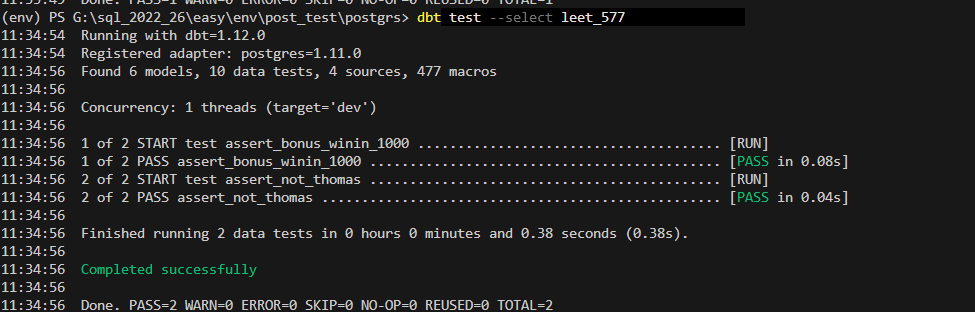
dbt test --select assert_bonus_winin_1000
You'll see output like:
Real-World Tips for Singular Tests
1. Test the Transformation, Not the Source
Always test models (built with {{ ref() }}), not raw sources. You want to validate your transformation logic, not whether the upstream data exists.
-- ✓ Good: tests the model
select * from {{ ref('sol_577') }}

-- ✗ Bad: tests the raw source (not your responsibility)
select * from {{ source('leetcode577', 'employee') }}
2. Use Descriptive Names
Name your tests so future-you (and your team) knows what they check:
✓ assert_sol_577_bonus_under_1000.sql
✓ assert_sol_577_employee_name_not_thomas.sql
✗ test_1.sql
3. Add Comments
Document what each test does:
-- This test ensures no employee appears twice in the result
select emp_id, count(*) as cnt
from {{ ref('sol_577') }}
group by emp_id
having count(*) > 1
4. Think in Negatives
Singular tests check for what's wrong. Flip your business logic:
✓ "Bonus should be < 1000 or null" → Test: "WHERE bonus >= 1000" ✓ "Employee names must exist" → Test: "WHERE name IS NULL"
Singular vs. Generic Tests
When should you use singular tests instead of generic tests?
| Scenario | Use Singular Test |
|---|---|
| Check one column's uniqueness | Generic (unique) |
| Check multiple columns together | Singular ✓ |
| Validate a join condition | Singular ✓ |
| Ensure business logic correctness | Singular ✓ |
| Check for data anomalies (e.g., future dates) | Singular ✓ |
Bonus: Multiple Tests for One Model
You can (and should!) write multiple singular tests for one model:
tests/
  ├── test_sol_577_bonus_under_1000.sql
  ├── test_sol_577_employee_name_not_null.sql
Each test focuses on one piece of validation. This makes debugging easier when a test fails—you know exactly what broke.
Wrapping Up
Singular tests are your escape hatch when generic tests aren't enough. They're SQL queries you write to catch the edge cases and business logic violations that matter for your pipelines.
Key takeaways:
Singular tests are
.sqlfiles in yourtests/directoryWrite them to catch problematic rows (WHERE clause finds what's wrong)
Test models, not sources
Use descriptive names and comments
Combine multiple singular tests to comprehensively validate your data
In the next post, we'll explore how to organize tests at scale and use dbt test selectors to run the right tests at the right time.
Happy testing!
Comments
Join the discussionNo comments yet. Be the first to comment.
