dbt Series #4: Data Contracts – Defining What Your Data Should Look Like
If you've worked with SQL long enough, you've probably experienced this frustration: you build a query that depends on specific columns existing in a table, with specific data types, only to have someone upstream modify the table and break your code. Data contracts in dbt solve this problem by making your data expectations explicit and enforced.
What's a Data Contract?
A data contract is a promise your dbt model makes about what data it will produce. It's like a formal specification that says: "This model will output exactly these columns, with these data types, and I guarantee it."
Without contracts, downstream users assume what columns exist and what they contain. With contracts, you're documenting and enforcing those assumptions.
The YAML File: Where Contracts Live
In dbt, contracts are defined in your models/ directory's .yml files (also called schema.yml or any YAML file). Here's the structure from our working example:
models:
  - name: model_name
    config:
      contract:
        enforced: true # true/false
    columns:
      - name: column_name
        data_type: colum_data_type
Let's break this down:
models:– The root section that defines all your dbt models in this filename:– The name of your model (matches the.sqlfilename)config:– Configuration settings for this specific modelcontract:– The contract configuration sectionenforced:– Boolean flag (true/false) that determines whether dbt enforces this contractcolumns:– List of column specificationsname:– The exact column name that must exist in your query resultdata_type:– The expected SQL data type
Enforced: True vs. False – What's the Difference?
This is the critical setting that determines how strict dbt is about your contract.
enforced: true
When you set enforced: true, dbt becomes a strict enforcer. Here's what happens:
dbt validates during runs – Before your model successfully builds, dbt checks:
Does your SQL SELECT statement produce exactly the columns listed in the YAML?
Are the data types correct?
Are there extra columns you didn't declare?
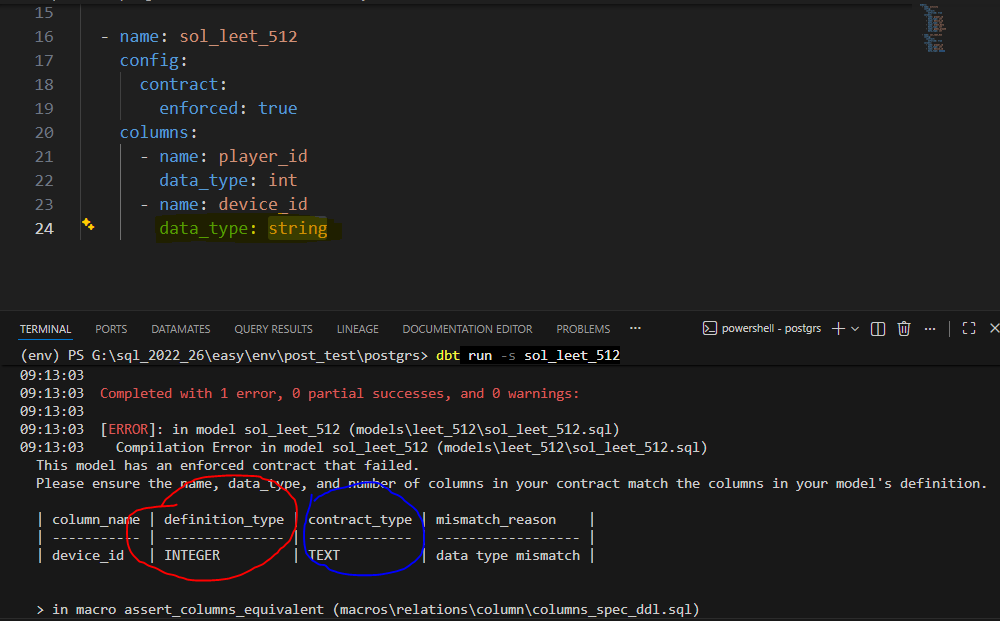
Mismatches cause failures – If your SQL produces columns that don't match the contract, dbt will fail the run with an error. This is intentional—you want failures to catch breaking changes early.
Protects downstream – Downstream models and dashboards can rely on these contracts. If someone tries to modify the model and breaks the contract, the pipeline stops rather than silently breaking everything downstream.
In our example, both activity and sol_leet_512 have enforced: true. This means:
activitymust produce exactly:player_id (int),device_id (int),event_date (int),games_played (int)sol_leet_512must produce exactly:player_id (int),device_id (int)
enforced: false
When you set enforced: false (or omit the config entirely, which defaults to false):
dbt only documents – The YAML file acts as documentation but is not enforced
No validation occurs – dbt doesn't check if your SQL matches the declared contract
Mismatches are allowed – Your model can produce extra columns or have different data types without causing errors
Less protection – Downstream changes that break the contract won't be caught by dbt
Use this during development when you're still experimenting, or for models where flexibility is more important than strict guarantees.
Why Use enforced: true?
Catches bugs early – Column name typos, incorrect types, or accidental additions are caught at build time, not when someone queries the table
Documents expectations – The YAML is your contract spec; it's clear what downstream users can depend on
Prevents silent failures – Without contracts, a breaking change silently propagates. With contracts, it fails loudly
Enables refactoring safely – You can refactor your SQL knowing that if you accidentally change the output shape, dbt will tell you immediately
when we fail our contact in yml.
All dbt Data Types for Contracts
dbt's contract system supports these data types (varies slightly by database):
Numeric Types
intorinteger– Whole numbers (e.g., 42, -5)bigint– Large whole numbers (e.g., 9223372036854775807)smallint– Small whole numbers (e.g., 32767)floatorfloat64– Decimal numbers with floating-point precisiondoubleordouble precision– Higher precision floating-pointdecimalornumeric– Fixed-precision decimal (e.g.,decimal(10,2)for currency)
Text Types
varchar– Variable-length textchar– Fixed-length texttext– Long text stringsstring– Generic text type
Date & Time Types
date– Calendar dates (YYYY-MM-DD)time– Time of daydatetime– Date and time combinedtimestamp– Timestamp with timezone infotimestamptz– Timestamp with timezone
Boolean Type
boolean– True/false values
Complex Types (database-specific)
array– List of valuesstructorjson– Nested/semi-structured dataobject– JSON object
Note: The exact supported types depend on your database (Snowflake, BigQuery, Postgres, etc.). Use the data types native to your specific database.
Real-World Example: LeetCode Problem #512
Let's look at how our example uses contracts:
activity.sql – The source model:
with cte as (
  select * from {{ source('leetcode512', 'activity') }}
)
select * from cte
model.yml – The contract promise:
models:
  - name: activity
    config:
      contract:
        enforced: true
    columns:
      - name: player_id
        data_type: int
      - name: device_id
        data_type: int
      - name: event_date
        data_type: date
      - name: games_played
        data_type: int

  - name: sol_leet_512
    config:
      contract:
        enforced: true
    columns:
      - name: player_id
        data_type: int
      - name: device_id
        data_type: int
sol_leet_512.sql – A downstream model that uses activity:
select
  player_id,
  device_id
from {{ ref('activity') }}
where (player_id, event_date) in (
  select player_id, min(event_date)
  from {{ ref('activity') }}
  group by player_id
)
The downstream model (sol_leet_512) can confidently rely on activity producing exactly those four columns with those exact data types. If someone accidentally removes event_date from the activity query, dbt fails immediately with a contract violation rather than silently breaking the join.
When to Use Contracts
✅ Use
enforced: truefor:Models that are dependencies for other models
Models used by dashboards or business intelligence tools
Core tables in your data warehouse
Models where data quality is critical
⚠️ Use
enforced: falseor skip contracts for:Ad-hoc, exploratory queries
Models in early development
Internal staging tables
Models that are rarely used downstream
Conclusion
Data contracts transform dbt from a build tool into a governance tool. By declaring what your models will produce and enforcing those promises, you protect your entire data stack from breaking changes. It's SQL-level thinking (types matter, schemas matter) applied to dbt.
In the next post in this series, we'll explore tests—another powerful way to validate and protect your data.
Questions to consider for your own models:
Which of your models are depended on by others?
Are there column names or types you'd want to protect from accidental changes?
Would
enforced: truecatch bugs in your pipelines today?
Comments
Join the discussionNo comments yet. Be the first to comment.

