A practical guide to defining, enforcing, and validating data integrity rules in your dbt models
Introduction
If you're coming to dbt from a SQL background, you're probably familiar with constraints at the database level—those guardrails that prevent bad data from sneaking into your tables. The good news? dbt lets you define these constraints in a centralized, version-controlled way. The even better news? We can make them work harder for us.
In this post, we'll explore how dbt constraints work, why they matter, and how to implement them in your data models. By the end, you'll understand exactly how to protect your data quality before it becomes someone else's problem.
What Is the dbt YAML File?
The YAML file (.yml or .yaml) is where dbt stores metadata about your models. Think of it as a contract between you and your data warehouse—it describes what data should look like and what rules it must follow.
Here's the structure:
models:
  - name: product
    config:
      contract:
        enforced: true
    constraints: [...]
    columns: [...]
Breaking this down:
models:– Declares one or more models in your dbt projectname:– The name of the model (must match your.sqlfile)config:– Configuration options that control how dbt builds and validates the modelcontract:– An optional section for data contracts (we'll get to this)constraints:– Table-level constraints that apply to the entire modelcolumns:– Individual column definitions and their column-level constraints
This YAML sits alongside your SQL files. For example, our product model has:
product.yml– The metadata (constraints, column definitions)product.sql– The SQL that creates the data
A Real Example: The Product Model
Let's look at the YAML file you provided:
models:
  - name: product
    config:
      contract:
        enforced: true
    constraints:
      - type: foreign_key
        columns: [product_id]
        to: ref('sales')
    columns:
      - name: product_id
        data_type: int
        constraints:
          - type: not_null
          - type: unique
          - type: primary_key
          - type: check
            expression: "product_id not in (2, 3)"
      - name: product_name
        data_type: string
        constraints:
          - type: not_null
      - name: unit_price
        data_type: int
        constraints:
          - type: not_null
This model declares several constraints:
Product ID cannot be NULL, must be unique, is the primary key, AND cannot be values 2 or 3
Product Name cannot be NULL
Unit Price cannot be NULL
There's a foreign key relationship with the sales model
The SQL that builds this? It's beautifully simple:
{{
  config(
    materialized = 'table',
  )
}}

with cte as (
  select * from {{ source('leetcode1082', 'product') }}
)
select * from cte
dbt takes your simple SQL and applies the constraints defined in the YAML. The magic is in the metadata.
Supported Materializations
Not all materializations support constraints equally. Here's what's available:
| Materialization | Constraints Supported | Notes |
|---|---|---|
| table | ✅ Full support | Default and most common; best for constraint enforcement |
| view | ⚠️ Limited | Constraints are enforced at query time, not physically stored |
| incremental | ✅ Full support | Constraints apply to new inserts and updates |
| ephemeral | ❌ None | Ephemeral models don't persist to database |
Best practice: Use materialized = 'table' when you need to enforce constraints. Views are useful for validation but won't physically prevent bad data at the database level.
Our example uses materialized = 'table', which is exactly right for enforcing constraints.
Definable vs. Enforced Constraints
Here's where it gets interesting. dbt distinguishes between two types of constraints:
Definable Constraints
These are constraints that dbt can define in your YAML file. Not all of them will be physically enforced at the database level, but they're documented and can be used for validation and testing.
All constraints are technically "definable"—you can write them in your YAML regardless of database support.
Enforced Constraints
These are constraints that your database actually enforces. If data violates an enforced constraint, the database will reject it.
Example:
✅ Enforced on PostgreSQL:
not_null,unique,primary_key,foreign_key,check⚠️ Definable but not always enforced:
relationships(depends on configuration)
When enforced: true is set in your model's contract, dbt will only use constraints that your database can actually enforce. This prevents dbt from silently failing to protect your data.
In your example:
config:
  contract:
    enforced: true
This tells dbt: "I want strict enforcement. Only apply constraints that PostgreSQL will physically enforce."
All Constraint Types in dbt for PostgreSQL
dbt supports the following constraint types. Here's what each does and whether PostgreSQL enforces them:
1. not_null
Status: ✅ Enforced by PostgreSQL
Prevents NULL values in the column.
- name: product_name
  data_type: string
  constraints:
    - type: not_null
SQL Generated: NOT NULL column constraint
Use When: A column must always have a value (e.g., product names, customer IDs)
2. unique
Status: ✅ Enforced by PostgreSQL
Ensures all values in the column are unique. Multiple NULL values are allowed (SQL standard).
- name: product_id
  data_type: int
  constraints:
    - type: unique
SQL Generated: UNIQUE constraint on the column
Use When: No two rows should have the same value (e.g., email addresses, SKUs)
3. primary_key
Status: ✅ Enforced by PostgreSQL
A combination of not_null and unique. Uniquely identifies each row in the table. Only one primary key per table.
- name: product_id
  data_type: int
  constraints:
    - type: primary_key
SQL Generated: PRIMARY KEY constraint
Use When: You need a unique identifier for each row (almost always)
4. foreign_key
Status: ✅ Enforced by PostgreSQL
Ensures values in this column(s) reference a primary key in another table.
constraints:
  - type: foreign_key
    columns: [product_id]
    to: ref('sales')
SQL Generated: FOREIGN KEY (...) REFERENCES table_name
Use When: You want to maintain referential integrity (e.g., every sale must reference a valid product)
Note: This is a table-level constraint, not a column-level constraint. It goes in the constraints: section at the model level.
5. check
Status: ✅ Enforced by PostgreSQL
Ensures values meet a specific condition. You provide the expression.
- name: product_id
  data_type: int
  constraints:
    - type: check
      expression: "product_id not in (2, 3)"
SQL Generated: CHECK (product_id NOT IN (2, 3))
Use When: You need custom validation logic (e.g., prices > 0, dates in the future)
SQL Generated: May not generate a physical database constraint (depends on adapter and configuration)
Use When: You want dbt to validate referential integrity during tests (often better than foreign_key for data warehouse scenarios)
Putting It All Together
Let's revisit your product.yml and break down each constraint:
models:
  - name: product
    config:
      contract:
        enforced: true                           # Strict enforcement mode
    constraints:
      - type: foreign_key                        # Table-level: Products referenced in sales
        columns: [product_id]
        to: ref('sales')
    columns:
      - name: product_id
        data_type: int
        constraints:
          - type: not_null                       # Can't be empty
          - type: unique                         # No duplicates
          - type: primary_key                    # Unique identifier for this table
          - type: check
            expression: "product_id not in (2, 3)" # Custom rule: exclude IDs 2 & 3
      - name: product_name
        data_type: string
        constraints:
          - type: not_null                       # Product must have a name
      - name: unit_price
        data_type: int
        constraints:
          - type: not_null                       # Price is required
** whan our canstrainis inforce and fail for check
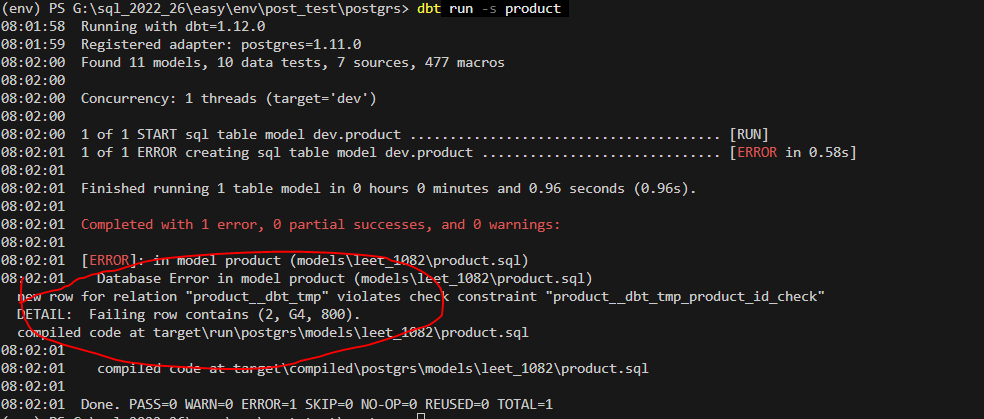
What this enforces:
✅ No NULL values in product_id, product_name, or unit_price
✅ Each product_id is unique
✅ product_id is the primary key
✅ product_id values cannot be 2 or 3 (unusual but valid for domain-specific rules)
✅ Every product_id in the sales table references a valid product_id here
Why Constraints Matter
You might think: "Why bother with constraints if I can just validate in dbt tests?" Good question. Here's why constraints are worth the effort:
Database-level protection – Bad data is rejected at the source, not just flagged in a test
Performance – The database can use constraints for query optimization
Compliance – Constraints provide documented proof of data governance
Fail-fast – Errors happen when data is inserted, not downstream
Clarity – Other analysts immediately understand data rules without reading documentation
Best Practices
Always set
contract: enforced: trueif you're using constraints. This prevents silent failures.Use
primary_keyon your grain column – Every table should have a unique identifier.Be specific with constraints – Don't just add constraints because you can. Each constraint should serve a purpose.
Test your constraints – Use dbt tests alongside constraints:
- name: product_id
  constraints:
    - type: primary_key
Document why – Add a description explaining the business logic behind non-obvious constraints:
- name: product_id
  description: "Primary key. Excludes placeholder IDs 2-3 per legacy system."
Start small – If you're new to constraints, begin with
not_nullandprimary_key, then expand.
Common Gotchas
❌ Constraint defined but not enforced If your constraint isn't working as expected, check:
Is your materialization
table(notvieworephemeral)?Did you set
contract: enforced: true?Is your database adapter PostgreSQL (or another that supports this constraint type)?
❌ Foreign key pointing to wrong table Use ref() to reference dbt models. Don't hardcode table names—it breaks if the model name changes.
❌ Constraints on incremental models without unique_id Incremental models need a unique identifier constraint to handle upserts correctly.
Comments
Join the discussionNo comments yet. Be the first to comment.

